

Motion used to be the part of a design job that got cut first. A client wanted a social version of the campaign, a product page wanted a little movement, a portfolio wanted to feel alive, and every one of those requests meant opening After Effects and losing an afternoon. AI video has changed that, but most AI video tools still expect you to write a careful prompt and roll the dice.
One-click AI effects take a different approach. You don’t describe a shot. You pick one that has already been directed, upload a still image, and get a finished clip back. PixelDojo has built one of the largest libraries of these effects, so we looked at how it works and where it is actually useful for designers.
What “One-click Effects” Actually Means
Each effect in PixelDojo’s library is a pre-built video shot. The motion, the camera move, the lighting and the sound are already set and tested. You supply the photo. The clip starts on your exact image, so the face, outfit, product or background you uploaded carries through into the video.
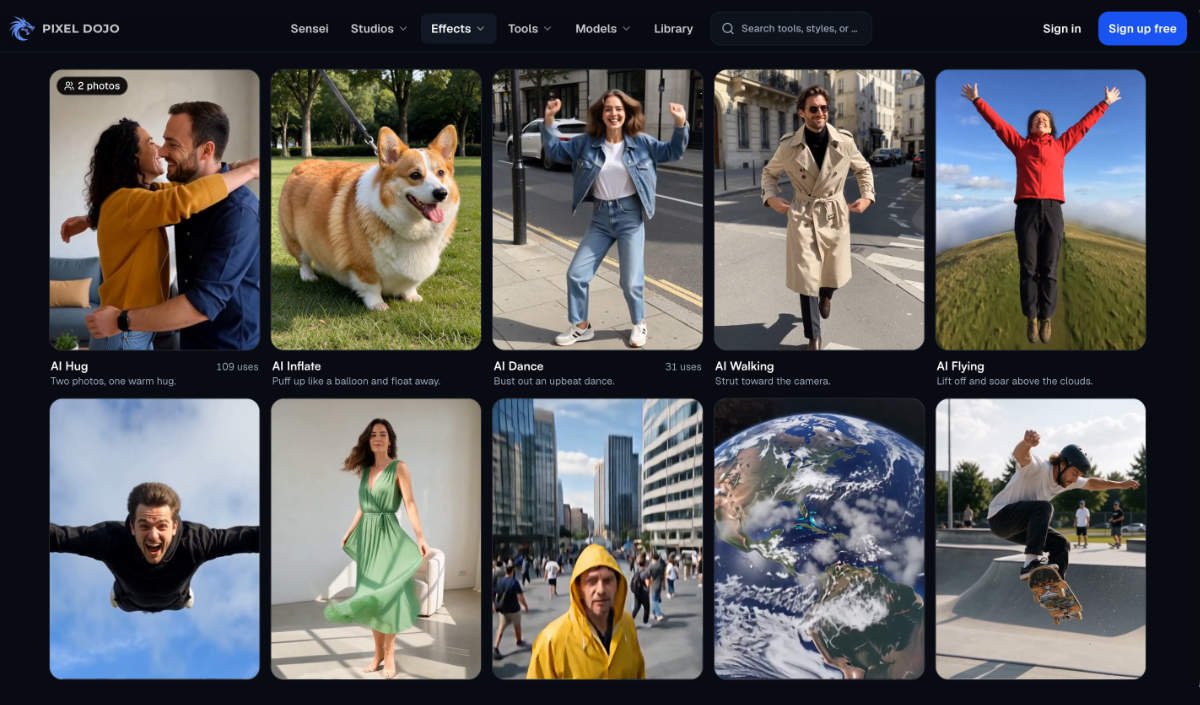
The library has more than 300 video effects and 45-plus photo effects. They cover a wide range:
- Camera moves, such as a slow dramatic dolly toward the subject, a smooth sideways slide, or a dive from outer space down to your photo.
- Transformations, such as an outfit turning into a gown of flowers, robotic armor locking into place, or a photo splitting into floating 3D layers.
- Product and listing shots, such as a clean turntable spin for a product, or scaffolding dropping away to reveal a finished home.
- Playful social formats, such as a figurine version of you in a blind box, a pet flying a propeller plane, or the concert big-screen moment.
Most effects need one photo. Duo effects such as hugs and dances take one photo of each person, and transition effects take a start frame and an end frame.
Where Designers Can Use Them

Product pages and e-commerce. The product spin effect turns a single packshot into a turntable video. For small brands without a 360 rig, that is the quickest way to add motion to a listing. The “selfie plus product” unboxing effect works well as a quick social ad test.
Portfolio and case-study covers. A slow dolly or parallax layer effect on a hero image gives a case study an animated cover without any keyframing. Because the clip starts on your exact frame, the composition you designed stays intact.
Real-estate and interior work. Effects built for property photos, such as the scaffolding reveal and listing walkthroughs, turn one render or photo into a short sequence that suits social posts or listing sites.
Client mood pieces. When a pitch needs to show how a campaign might move, a few effect clips on the key visuals communicate tone faster than a static board.
Social content at volume. Seasonal and trend effects, from Halloween pet hats to award-stage moments, are designed for the formats that perform on Reels, TikTok and Shorts. For a designer managing a brand’s social calendar, they are a fast way to keep the feed moving.
The Workflow
The process is deliberately short:
- Open the effects library and choose an effect. Each one has a preview, so you know what the motion will look like.
- Upload a photo. A clear, well-lit image where the subject fills a good part of the frame gives the best results.
- Press Generate. There is no prompt to write.
For anyone who wants to evaluate the library before committing, you can try it here: a free PixelDojo account makes three effects a day, with a small watermark and no card needed. Every paid plan removes the cap, and the effects run in unlimited “Relax” mode without using credits.
How the Results Hold Up
The strength of a pre-directed effect is consistency. Because the shot has been designed and tested in advance, you don’t get the random camera drift or melting backgrounds that often come with free-form prompting. Faces and products keep their identity because the video starts on the uploaded frame.
The trade-off is control. You can’t change the camera path or timing of an effect. If a project needs a specific move, PixelDojo also offers the full video models behind the effects, including Veo, Seedance, Kling and WAN, where you write the shot yourself. Its image-to-video tools sit next to the effects for exactly that case.
Input quality matters too. A low-resolution or busy photo gives a weaker clip, so it is worth preparing a clean crop before uploading, just as you would for any production asset.
Pricing in Brief
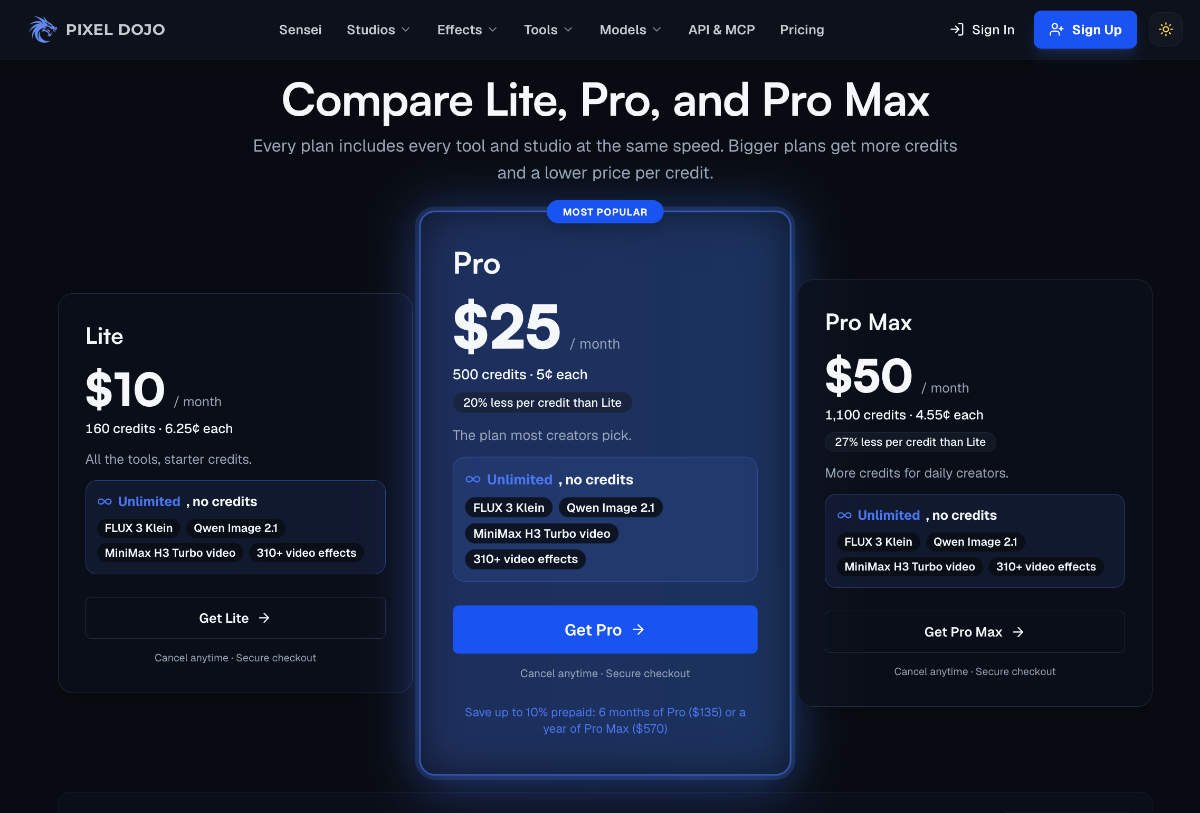
Beyond the free daily effects, PixelDojo’s plans run from $10 a month (Lite) to $50 a month (Pro Max), with Pro at $25 the most popular. Every plan includes all the effects without limits, plus credits for the premium video and image models, and commercial use is included. On a first purchase there is a seven-day refund window.
Should Designers Add it to the Toolkit?
One-click effects won’t replace motion design for bespoke work. They do cover a large share of everyday requests for motion, such as a moving product shot, an animated cover or a quick social clip, in seconds instead of hours. With three free effects a day, there is little reason not to keep the library bookmarked for the next time a client asks whether the image can move.
